A private, on-device reuse vault
Everything you reuse, one tap away.
Stop reopening PDFs to copy one number. Save the things you reuse and drop them into any app from a private, on-device keyboard. No account, nothing in the cloud.
Watch the 90-second demo- No account
- Nothing uploaded
- Works offline
See it in 90 seconds
Save it once. Watch it come back.
Real app footage · iPhone and Android · captions burned in
The problem
You keep retyping the same things
You retype the same things constantly — a policy number buried in a PDF, a Wi-Fi password, a shipping address, the reply you send ten times a week. BackPocket keeps those in one private place and hands them back wherever you're typing, without reopening the source.
The PDF
A policy number buried on page four
Reopen the document, pinch around, copy one line, switch back. Every time someone asks for it.
The password
The Wi-Fi password, again
It lives in a settings screen or a photo of the router. Guests keep asking anyway.
The reply
The message you send ten times a week
Same wording, different name and date. You retype it, or hunt for the last time you sent it.
How it works
Save once. Reuse everywhere.
01
Save it once
From any app via the Share sheet, from the clipboard, or with the camera.
02
BackPocket pulls out the reusable bits
On-device OCR and Smart Fields find the numbers, codes, addresses, and dates.
03
Get it back while you're typing
Switch to the BackPocket keyboard in any app. Search, tap, done. The source never opens.
Two letters is usually enough
The keyboard
Your pocket, in every app
Recorded on Android, not mocked up: the BackPocket keyboard types a saved client email straight into a contact form.
- 01Any text fieldHere, a new-contact form. The name goes in with the normal keyboard.
- 02Switch to BackPocketYour pinned and recent items appear as chips — Smart Fields included.
- 03Tap a chipIt's typed for you. No copying, no app switching.
Private by construction
Smart Fields
Paste the fact, not the file
BackPocket reads what you save on your device and pulls out the parts you actually reuse: phone numbers, confirmation codes, IBANs, policy numbers. Sensitive ones stay masked.
booking.pdf on-device · nothing uploaded
Hotel booking confirmation
Hotel Alfama Terrace · 2 guests
Confirmation no. HB-58813
Front desk +351 21 555 0134
Payment to GB29 NWBK 6016 1331 9268 19
Check-in from 15:00 · Late arrival OK
Front desk phone
+351 21 555 0134
Confirmation code
HB-58813
IBAN · masked
•••• 9268 19
One question
“Will I need this again?”
BackPocket answers one question: “will I need this again?” It isn't a notes app, a clipboard logger, or a password manager. Everything is organised around getting something back fast — grouped automatically, searchable in two letters.
Not a notes app
It isn't for writing or thinking. It's for getting things back.
Not a clipboard logger
There is no background clipboard monitoring. Saving is always something you tap.
Not a password manager
It doesn't manage logins or autofill credentials.
Not a cloud service
There is no account and no server.
Features
Built around getting things back
Every feature serves the same loop: capture fast, understand on-device, keep it organised without effort, and hand it back the moment you need it.
Capture
Get things in from wherever they already are.
Save anything
Text, links, images, files, and whole documents.
From any app
Send it over with the system Share sheet — no exporting, no re-finding it later.
Paste to save
Save straight from the clipboard. Always something you tap — never something running in the background.
Save while typing
Add to BackPocket from inside the keyboard, without leaving the app you're in.
Pocket It
Select text in any app and send it over from the selection menu.
Duplicate detection
Near-duplicates are caught on save, so one thing exists once.
Voice capture
Tap the microphone and speech is transcribed on-device into a text note.
Understand
The reusable bits are pulled out for you, on-device.
On-device OCR
Point the camera at a card, label, or document — the image is kept and the reusable text extracted alongside it.
Smart Fields
Reference numbers, IBANs, policy numbers, codes, addresses, dates, and links are found automatically — no field-by-field copy-pasting.
Review before saving
Parsed fields can be edited inline on the review sheet before anything is kept.
Organize
No manual foldering required.
Automatic grouping
Related items cluster on their own, labelled in plain language — “Looks like: Apartment Rental.”
PocketBits
Everything you've saved, grouped.
Pin, archive, delete
Keep what's current close and move the rest out of the way.
Type-aware cards
Each item type carries its own icon shape and a restrained colour tint — never colour alone.
Tags
With autocomplete and filtering, for when you do want your own labels.
Recall
Getting something back is the whole point.
Search-first home
Frecency ranking — recency plus frequency — so what you actually reuse rises to the top with zero manual favouriting.
Two-letter search
“Two letters is usually enough” is the app's own search placeholder — and usually the truth.
Ready to reuse
A row of what you're most likely to need next.
Voice search and filters
Say it instead of typing it, or narrow results by type.
The BackPocket keyboard
Switch to it in any text field — search, tap, and the value is inserted. The source app never opens.
Privacy
Private by design, not by policy
There is no account to create and no server to trust. The honest boundary: BackPocket does no background clipboard monitoring — saying what it doesn't do is part of the design.
- Everything lives on the device
- No account, no sign-up, nothing uploaded. The app is fully usable the moment it opens — “no account, ever” is stated up front.
- The keyboard works without Full Access
- So it cannot phone home. Full Access is optional and only enables usage-count syncing back to the app.
- Sensitive values are encrypted at rest
- The device Keychain / Android Keystore wraps an envelope cipher. Values stay masked as dots until you reveal them.
- Reveal and copy sit behind biometrics
- Face ID or Touch ID gates both. Revealed screens are kept out of the app-switcher snapshot.
- Masked everywhere it matters
- Sensitive values stay masked in the keyboard and in search, not just in the app.
- No background clipboard monitoring
- A deliberate boundary, not a missing feature. Saving from the clipboard is always a tap you make.
- Extensions never touch the live database
- The keyboard, widget, and Shortcuts all read a separate sanitized snapshot.
- Insights are content-free
- Computed on-device from counts, not contents.
- Export and restore are free forever
- Your data is never held behind a subscription — viewing, filling, exporting, and restoring always work.
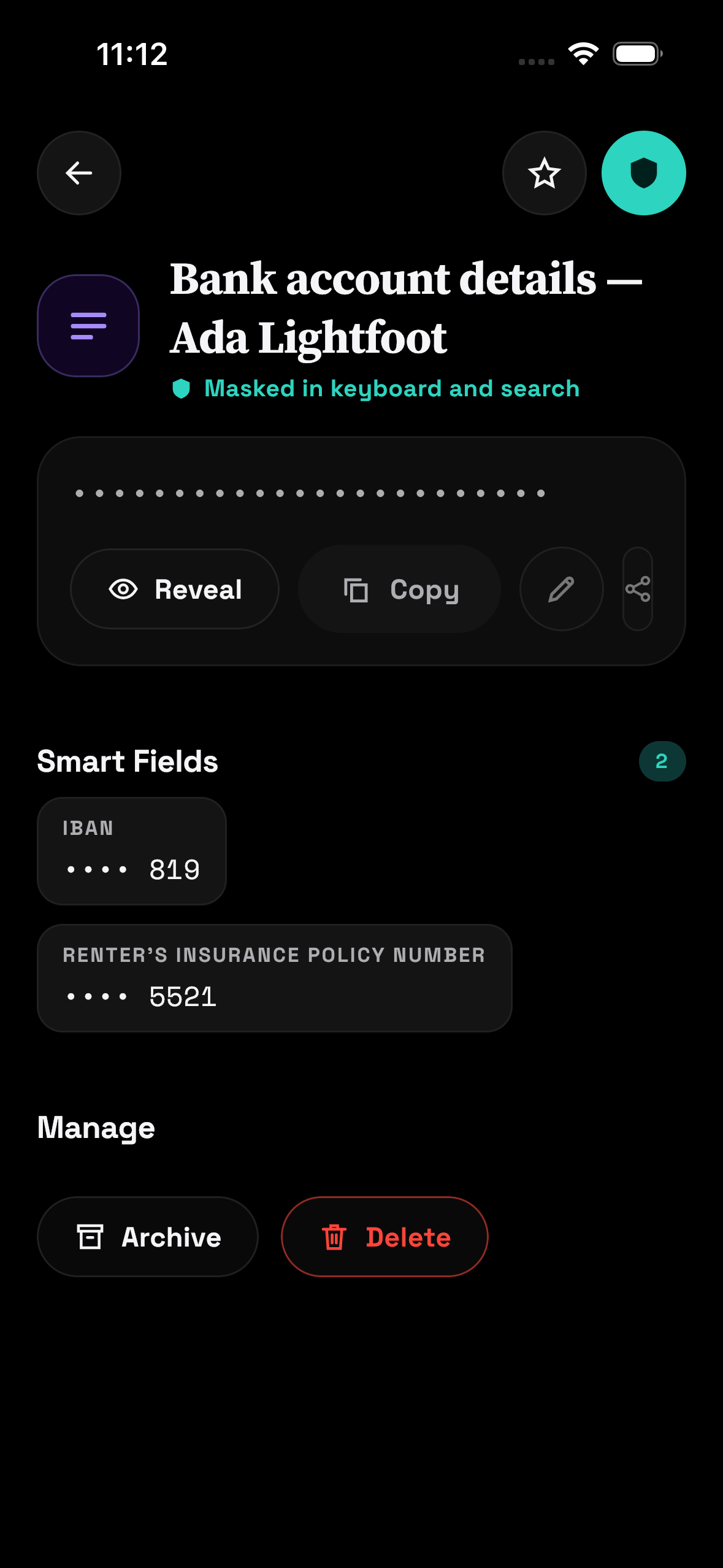
Masked as dots until you reveal —
Face ID / Touch ID gated
Templates & Kits
For the things you send, not just the things you store
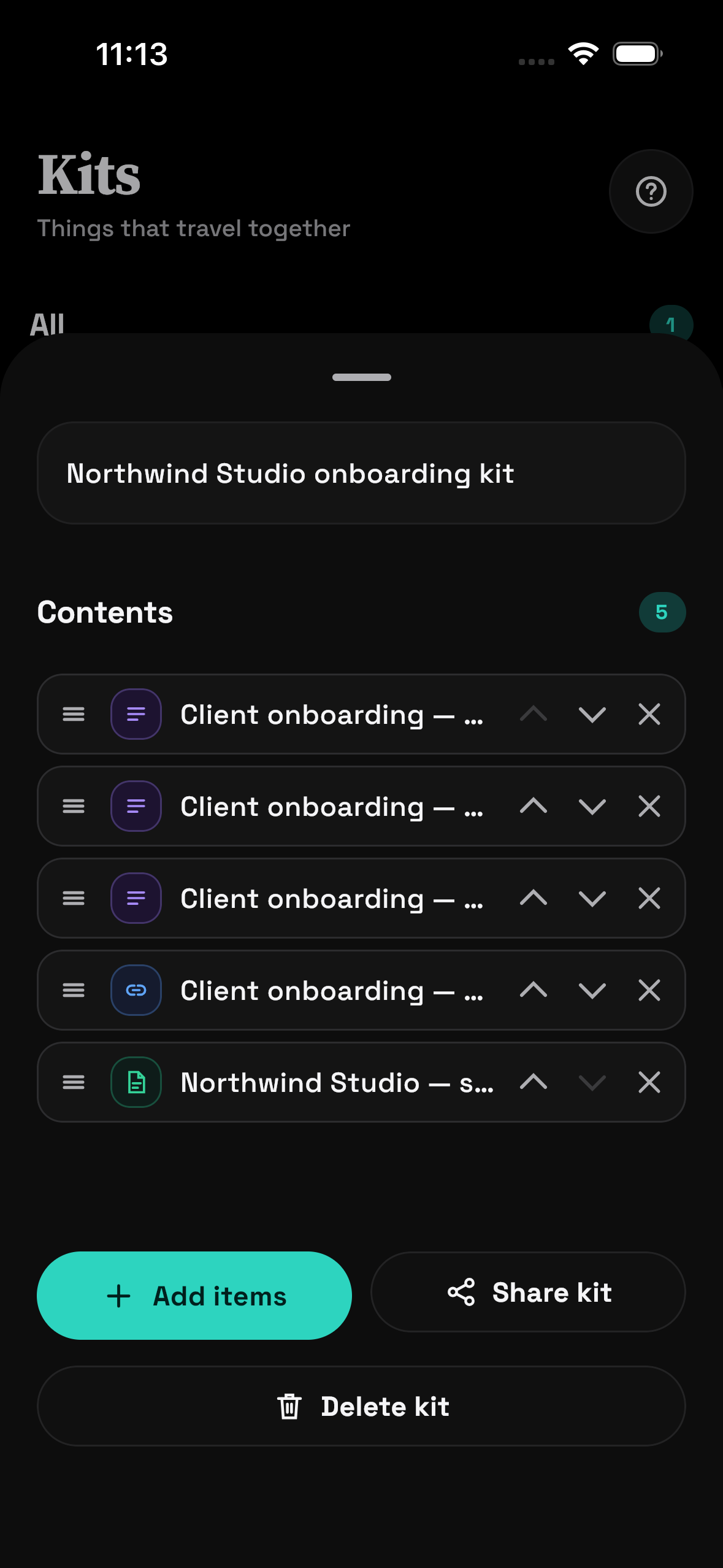
Turn things you reuse into fill-in-the-blank templates. Bundle related items into a Kit and share it — a new hire's onboarding details, a trip's confirmations — as one link.
Templates
Write once, fill at paste time
You never start from a blank page. Every template begins as a personal-data block from the built-in catalogue — fill in your own values once, and anything left as a {placeholder} is prompted for at paste time.
- Home address6
- Payment details4
- UPI / instant pay2
- Passport block5
- Driving licence3
- Emergency contact4
- Vehicle details4
- WiFi for guests2
- Company details4
The number is how many fields each block fills.
Kits
Things that travel together
Bundle related items into one Kit — a new hire's onboarding details, a trip's confirmations. Reorder, add items, and share or export the whole Kit as one link.
Platforms
iOS and Android, honestly
Both platforms get the core loop — keyboard, share, OCR, Templates, and Kits. Some surfaces only exist on one side, and this table doesn't pretend otherwise.
| Surface | iOS | Android |
|---|---|---|
| Custom keyboard | Yes | Yes |
| Share from any app | Yes | Yes |
| On-device OCR / scan | Yes | Yes |
| Templates and Kits | Yes | Yes |
| Text-selection “Pocket It” | Not applicable | Yes |
| Quick Settings tile | Not applicable | Yes |
| Home Screen widget | Yes | Yes |
| Control Centre control | Yes | Not applicable |
| Spotlight search | Yes | No |
| Shortcuts / App Intents | Yes | No |
| Optional iCloud sync — off by default, your own private database | Yes | No |
| Export / restore | Yes | Yes |
— means the surface doesn't exist on that platform at all.
Pricing
Free to live in. Pro when you outgrow it.
Free forever
No account. No trial clock.
- 25
- active items(archived items don't count against it)
- 5
- OCR documents
- 1
- Kit
Creating templates is part of Pro.
Monthly
$0.99
per month
Annual
$4.99
per year
BackPocket Pro unlocks unlimited itemsunlimited OCRunlimited Kitscreating templates
The fairness rule
A lapsed subscription never ransoms your data
Free limits can stop a new save, OCR run, or Kit creation. They never block reading your items, reusing them from the keyboard and search, exporting them, deleting them, or restoring purchases. Everything you already made keeps working — viewable, fillable, exportable — forever.
- Reading your items — always free
- Reusing them — keyboard, search, everywhere — always free
- Exporting them — always free
- Deleting them — always free
- Restoring purchases — always free
“Your data is always yours. Viewing, filling, exporting, and restoring your items is free forever — even if a subscription lapses.”
FAQ
Fair questions, straight answers
Do I need an account?
No. There is no sign-up or login of any kind.
Is my data uploaded?
No. Everything stays on your device.
Is this a password manager?
No — it doesn't manage logins or autofill credentials. It's for the things you reuse and retype.
Does the keyboard need Full Access?
No. It works without it. Full Access is optional and only syncs usage counts back to the app.
Does it read my clipboard in the background?
No. Never. Saving from the clipboard is always something you tap.
What happens if my subscription lapses?
Everything you've made stays viewable, fillable, and exportable. Free forever.
How do I enable the keyboard?
Settings → General → Keyboard → Keyboards → Add New Keyboard → BackPocket.
Is it on Android?
Yes — with the keyboard, share, Quick Settings tile, home-screen widget, OCR, Templates, and Kits. Spotlight and Shortcuts are iOS-only.
How do I get the app right now?
BackPocket is live on the App Store and Google Play. The download buttons on this page take you straight to both.
Save something once. Get it back in two letters, from anywhere.
- No account
- Nothing uploaded
- Works offline